
Reports: cash book, old dues, sales and profit
In short
Open Reports for four views: Cash book (money in and out), Old dues (who has owed for how long), Sales (credit and cash by day or month) and Profit (an estimate after costs).
On this page
Open Reports (under Run your shop) to see four views of your shop: Cash book for money in and out of the till each day, Old dues for who owes you and for how long, Sales for credit and cash sales by day or month with your top customers and items, and Profit for an estimate of what you made after the cost of goods and expenses. Pick a period with the chips at the top, such as This month or Last 3 months.
Reports are for the owner and branch managers, and every figure is kept separate for each currency.
Pick the period and branch
The period chips are This month, Last month, Last 30 days, Last 3 months and This year. The owner can also switch between All branches and a single branch; a manager always sees their own branch.
Old dues: who has owed for how long
Old dues is the report to open before a reminder round. It shows what customers owe in four age groups, 0–30 days, 31–60 days, 61–90 days and Over 90 days, plus a Total. Below, each customer is listed with their balance and "Oldest from" the date of the oldest money they still owe.
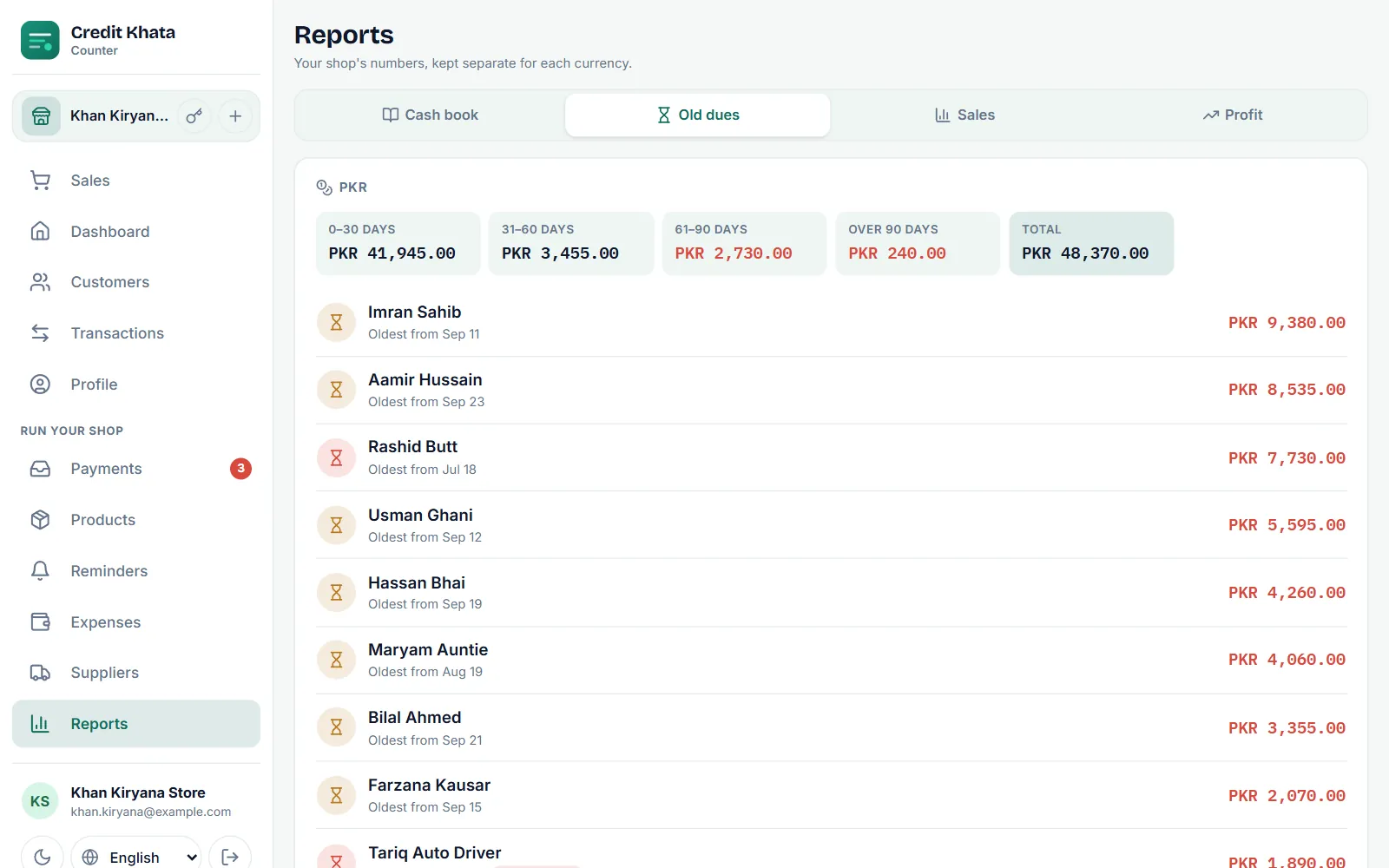
How the ages are worked out: payments clear the oldest credit first, and the opening balance counts as the oldest of all, dated when the customer was added. So a customer who pays something every week but never catches up still shows old money, because the report looks at what is left unpaid, not at when they last paid.
Sales: credit and cash over time
Sales shows Credit sales, Cash sales, Received (payments in) and the number of Entries for the period, a chart of Total sales, and a table by day. Switch to By month for a longer view. Under the table you will find Top customers and Top items; top items come from sales rung up with products.
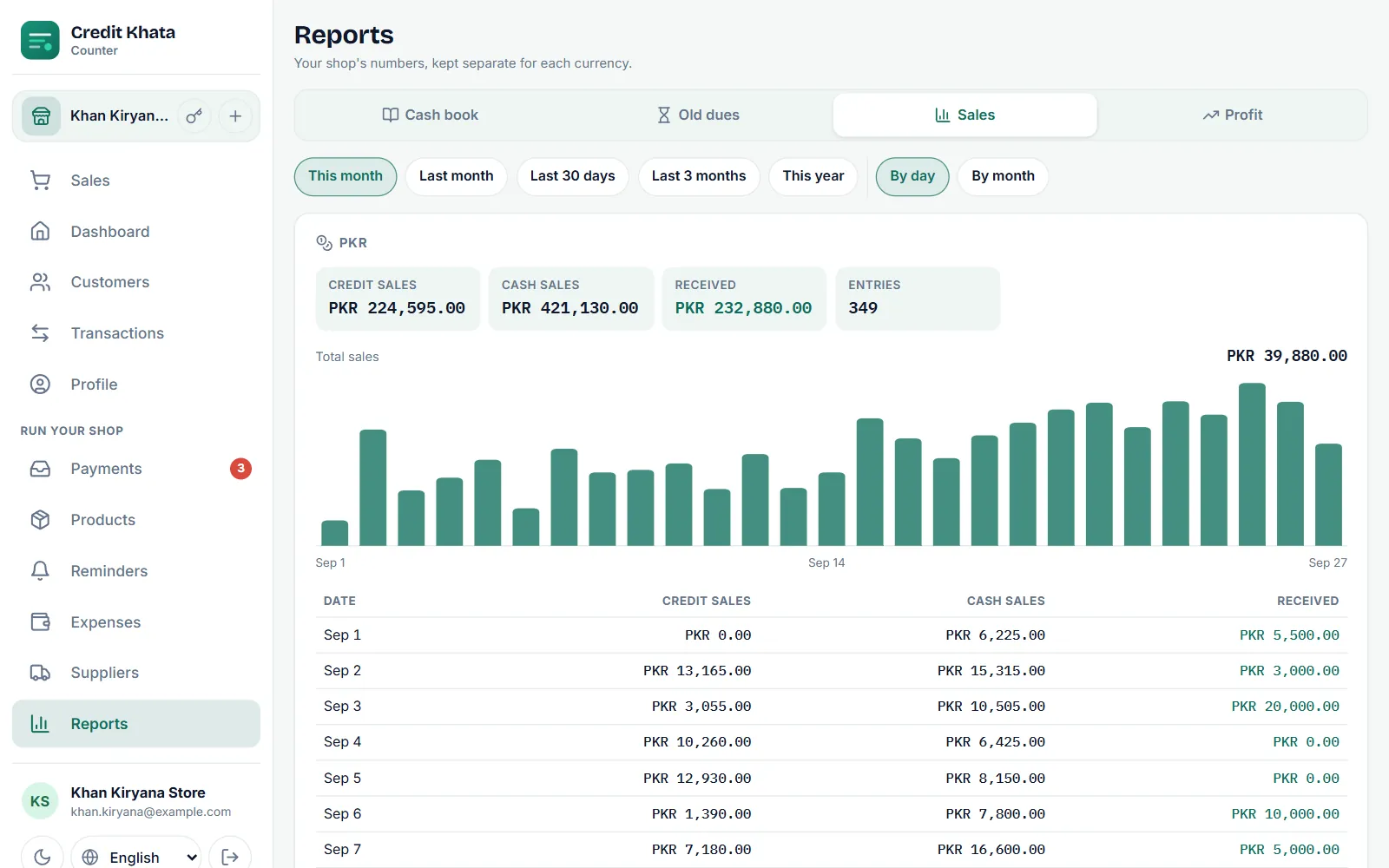
Comparing Credit sales with Received tells you whether credit is growing faster than it is being paid back.
Cash book: money through the till
Cash book lists, day by day, the cash that came In (Cash sales and Payments received) and went Out (Expenses and Paid to suppliers), with the Net cash for each day and the period: what the drawer should hold. Beside them, Non-cash in and Non-cash out show money that moved by bank, wallet or another method, and Net, all money adds both together. Credit sales are not in the cash book, because no money changed hands.
To fill in the "out" side, record your spending under Expenses (Add expense with an amount, date and a category such as Rent, Bills, Wages or Stock) and what you pay suppliers under Suppliers (Bought on credit and Paid supplier on each supplier's page).
Profit: an estimate
Profit takes Sales, subtracts the Cost of goods and your Expenses, and shows the Estimated profit, followed by expenses by category.
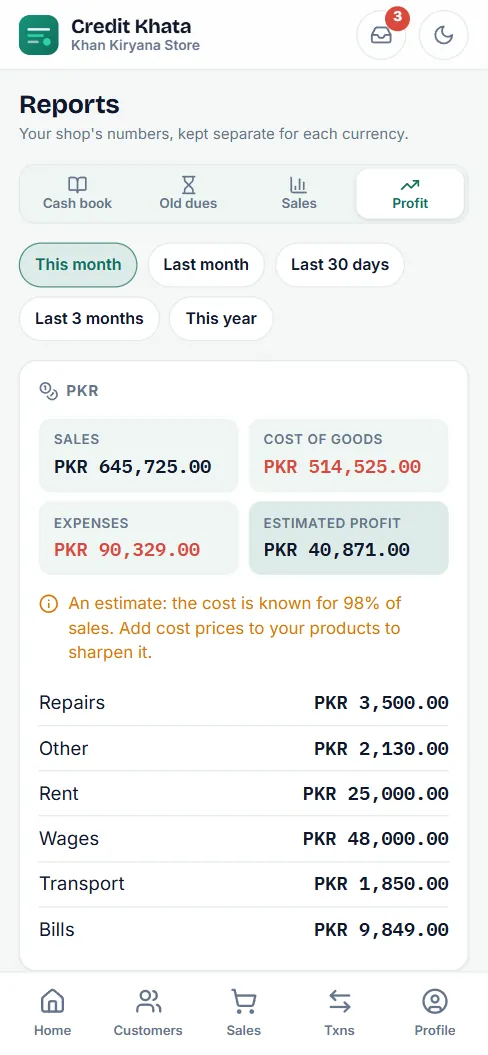
The cost of goods is known only for products that have a Cost price. The report says how much of your sales that covers, for example "the cost is known for 98% of sales", and asks you to add cost prices to sharpen it. See Add products, track stock and see what is running low.
Other numbers worth knowing
- Dashboard shows the Outstanding total customers owe you, what was Sold on credit and Received all time.
- Customers can be sorted by Highest owed and filtered to Owes you, and exported with Export CSV.
- For one customer's full history, print their statement: Print or share a customer's account statement.
- On Pro, Ask your books answers questions about your numbers in plain words. It has a weekly allowance of answers, and the screen shows how many are left this week.
In the Android app, open Reports from Home (in your shortcuts or under All tools). The same reports are there, with the ageing view called Credit age.
Frequently asked questions
Who can see reports?
The owner and branch managers. A manager sees only their own branch; the owner can see the whole business or pick one branch.
How are the Old dues ages worked out?
Payments clear a customer's oldest credit first, and the opening balance counts as the oldest of all. What is left is grouped by how many days ago it was taken: 0–30, 31–60, 61–90 or over 90 days.
Why is the profit called an estimate?
It subtracts the cost of goods only for sales of products that have a cost price. The report shows what share of sales had a known cost; add cost prices to make it more accurate.
What if I have customers in two currencies?
Every report is kept separate for each currency, so rupees are never added to dirhams.
Can I export the numbers?
The customer list can be exported as a CSV file from Customers. The owner can also download all business data as one file under Profile → Security and data.
Was this article helpful?
Need a hand?
Send us what you see on screen — a screenshot helps — and we will walk you through it.