
Record payment wey you collect from customer
For short
Open di customer, choose Don pay under Add transaction, put di amount and tap Add transaction. Their balance go reduce sharp sharp; part payment dey okay.
For this page
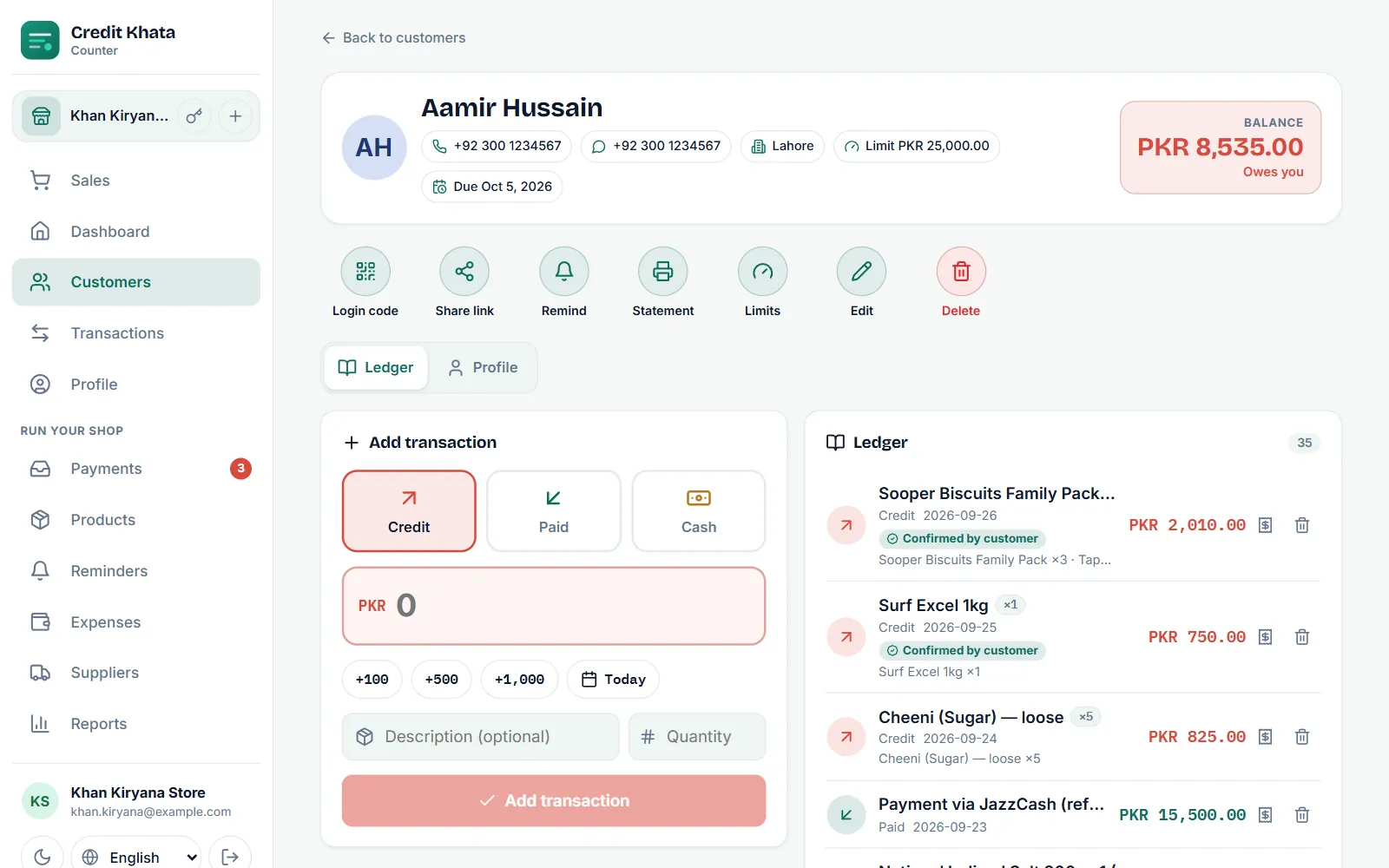
To record money wey customer hand you, open their page for Kostoma dem, choose Don pay under Add transaction, put di amount and tap Add transaction. Di payment go show for green for their ledger and their balance go reduce sharp sharp, for your screen and for their own.
Use Don pay for cash for di counter or any payment wey you don check by yourself. When customer pay by JazzCash, Easypaisa or bank and tell you for di app, you go confirm their claim instead; see Confirm payment wey customer talk say dem don make.
Record payment for di counter app
- Open Kostoma dem and tap di customer. Their Balance dey show for di top right.
- Under Add transaction, tap Don pay.
- Type di amount, or use +100, +500 and +1,000 to build am up.
- If di money come for another day, tap di date chip (e dey show Today) and pick di date.
- If you want, add Description (no compulsory) like "Cash, salary day" or "Part payment".
- Tap Add transaction to save am.
Customer wey on alerts go get notification with di payment and their new balance. Credit Khata no dey send text by imself for di Free or Pro plan; automatic SMS and WhatsApp messages na part of di Business plan, from di 1st of di month after Business start. To message customer by yourself, use Remind for their page, wey go open your own WhatsApp or SMS; see Send payment reminders for WhatsApp or SMS.
Payment dey always record, even for day wey your plan transaction limit don reach.
Part payment and advance
Most credit dey come back small small, and e dey okay: record each amount as e dey come. Di balance go always show wetin remain.
- Part payment: di rest go remain for di account. For Reports → Old debts, payment dey clear di customer oldest credit first, so wetin still remain na always di newest part of wetin dem carry.
- Payment wey pass di balance: record di full amount. Di customer balance go go under zero, their account go show say di shop dey owe dem, and their next purchases go use am finish.
Check am for di statement
Every payment dey listed for di Money wey dem pay column for di customer statement, beside di running balance, so both of una fit see exactly how di total move.
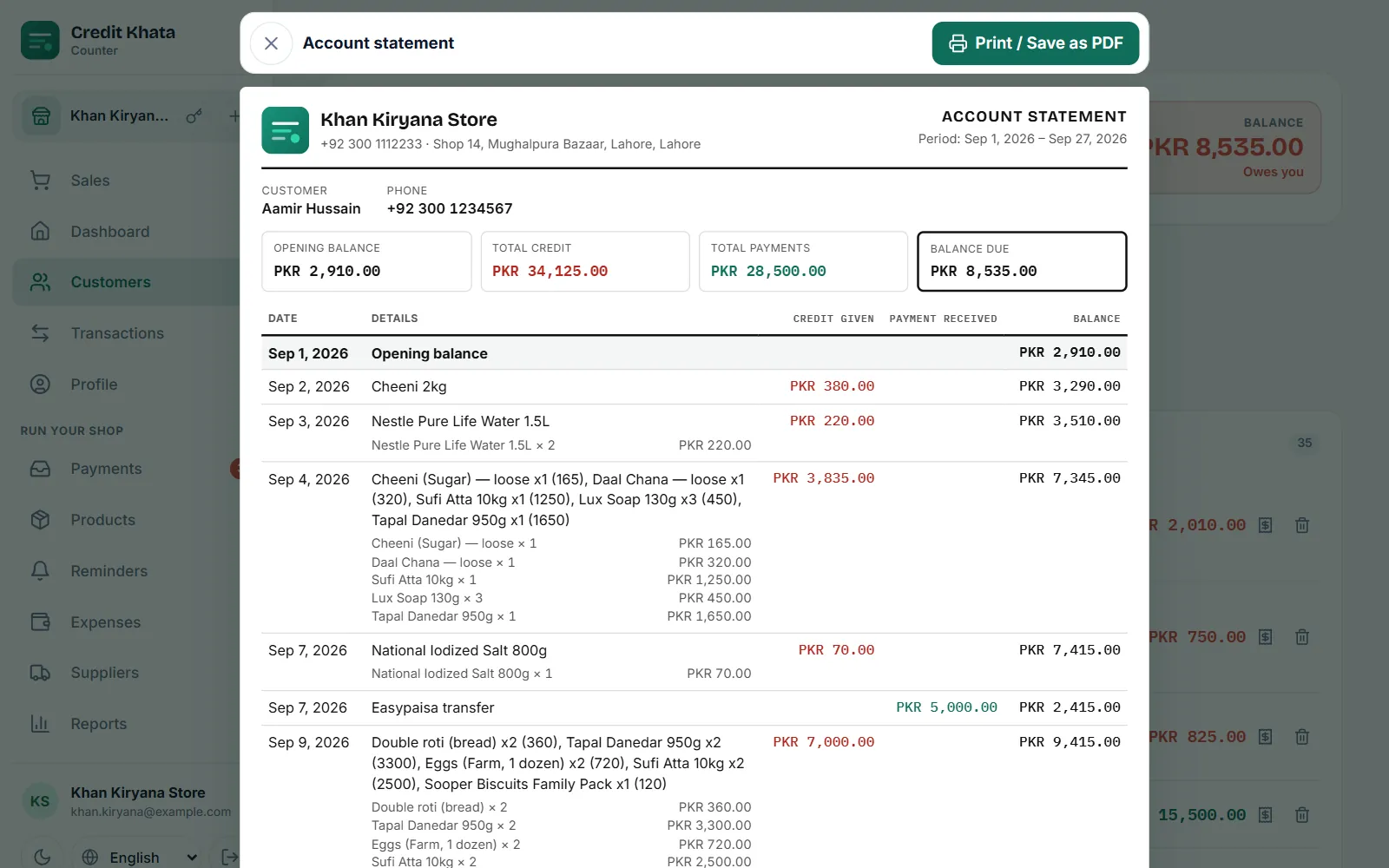
See Print or share customer account statement.
Give receipt
Every line for di customer ledger get Print receipt button. Di receipt dey show di entry number, date, customer, amount and di balance after di payment. Choose di paper width wey match your printer (58 mm or 80 mm), den tap Print / Save as PDF. Everybody for di counter, including cashiers, fit print receipts.
You record wrong amount?
Nobody dey edit entries for where dem dey. Owner or manager go tap Cancel entry for di wrong line (and add Reason (if you like) if dem want) and add am again with di correct amount. Di line wey dem cancel go still dey di account with line across am and e no go count for any balance again; Bring am back dey restore am inside 30 days. Cashiers no fit cancel entries, so dem suppose ask manager.
For di Android app
Open di customer, tap New entry, choose Don pay, put di Amount, description if you want and di date, den tap Save. For di counter app, entries for customer page need network; but di Android app go keep di entry for di phone as E dey wait when network no dey and e go upload am by imself later. See Work offline and keep your ledger in sync.
Questions wey people dey ask
Customer fit pay only part of wetin dem owe?
Yes. Put wetin dem pay under Don pay. Di rest go remain for their balance, and di Old debts report go use di payment clear their oldest credit first.
Customer pay me by JazzCash and tap I don pay. I go still add Don pay entry?
No. Confirm their payment for Payments instead. When you confirm, e go write di Don pay entry for you, so if you add another one by hand, di money go count two times.
Wetin if customer pay pass wetin dem owe?
Record di full amount. Their balance go go under zero and e go show say di shop dey owe dem, and their next purchases go clear am.
I fit give di customer receipt?
Yes. For di entry for their ledger, use Print receipt and choose 58 mm or 80 mm paper, or save am as PDF.
This article help you?
You need help?
Send us wetin you dey see for screen — screenshot go help — and we go waka you through am.