
Print or share customer account statement
For short
Open di customer, tap Statement, pick di period and tap Open statement. Den use Print / Save as PDF to print am or keep PDF wey you fit send for WhatsApp.
For this page
To make statement, open di customer page, tap Statement, choose period like Dis month or From di beginning, and tap Open statement. Di statement go open for screen with your shop name and details, di opening balance, every credit and payment with running balance, and di balance wey remain. Tap Print / Save as PDF to print am or save am as PDF wey you fit send for WhatsApp.
Statement na di fastest way to settle "how e take reach dis much?", because every line wey make di total dey one page.
Make statement for di counter app
- Open Kostoma dem and tap di customer.
- Tap Statement for di row of buttons. Di sheet Print statement go open: "Pick di period. Di statement go open here, ready to print or save as PDF."
- Choose Dis month, Last month, Last 3 months, From di beginning, or Pick dates and set From and To.
- Tap Open statement make e open.
- Check am, den tap Print / Save as PDF.
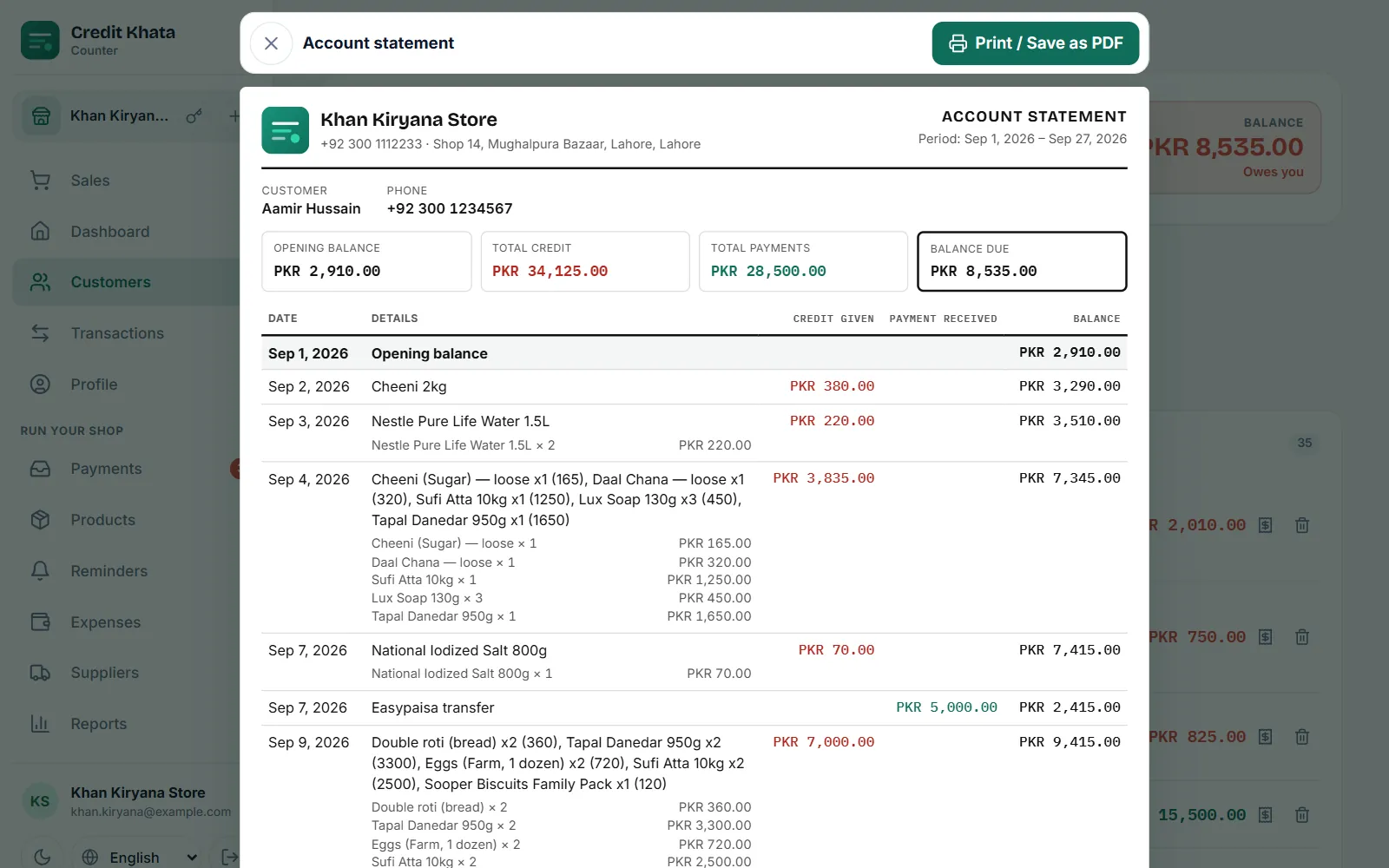
Wetin di statement dey show
| Part | Wetin dey inside |
|---|---|
| Header | Your shop name, phone and address, "Account statement" and di period |
| Customer | Name and phone |
| Totals | Balance for di start, All di credit, All di payment and Balance wey remain (or Extra money for your side if na di shop dey owe dem) |
| Lines | Date, Wetin happen with each item and quantity, Credit wey dem give, Money wey dem pay and Balance |
| Footer | Balance for di end and di date wey dem generate am |
Cash sales wey you record for di customer go show as Cash sale and dem no dey change di balance. Any line wey di customer don argue go get mark Customer talk say e no correct; see When customer argue entry: check, correct and settle am.
Di statement dey arranged for A4 paper. For one single entry for small counter printer, use Print receipt for dat line instead, wey get 58 mm and 80 mm width.
Save as PDF and share am for WhatsApp
- Tap di Print / Save as PDF button.
- For di print window, choose Save as PDF (di wording depend on your browser or phone) as di printer, and save.
- Open WhatsApp, go di customer chat, attach di PDF as document, and send.
For di Android app
Open di customer and tap Statement, pick di period, and use di buttons for di bottom: Print / Save as PDF, WhatsApp, or Share PDF to send di file through any app for your phone.
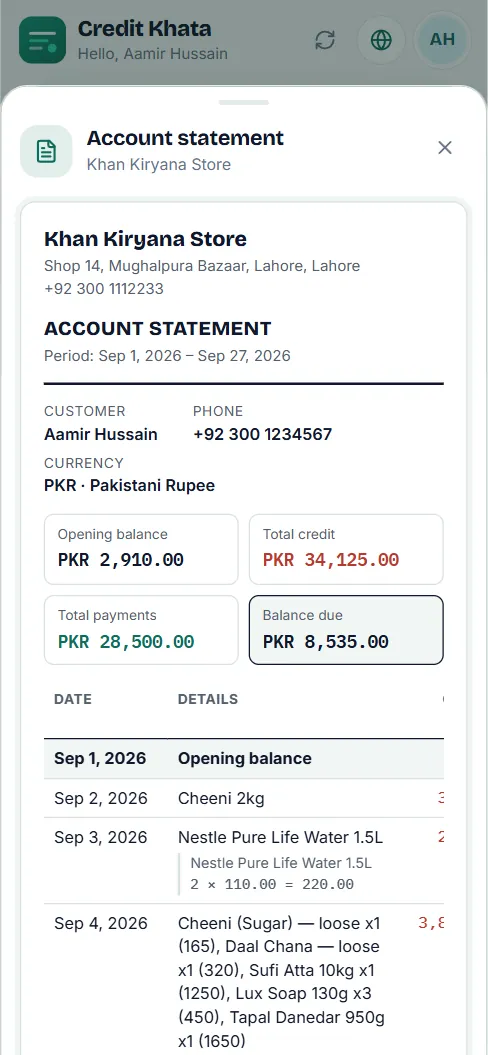
Di customer own statement
For their account, di customer go tap Statement, choose Dis month, Last month, Choose month, Choose your dates or Everything, and tap Open statement. Dem fit print am or save am as PDF di same way.
Who fit make statements
Statements na for di owner and managers. Everybody for di counter, including cashiers, fit print receipt for one single entry. See Give staff their own logins: manager or cashier.
To look all customers at once, use Reports: cash book, old debts, sales and profit.
Questions wey people dey ask
Cashier fit print statement?
No. Statements na for di owner and managers. Cashiers fit print receipt for one single entry.
How I go send di statement for WhatsApp?
For di counter app, choose Print / Save as PDF and save am as PDF, den attach di file for WhatsApp. For di Android app, use di WhatsApp or Share PDF button for di statement.
Di customer fit get their own statement?
Yes. For their account dem go tap Statement, choose period and open am, ready to print or save as PDF.
Di statement dey show entries wey customer argue?
Yes. Any line wey di customer don argue go get mark Customer talk say e no correct, so di statement no dey ever hide question wey still dey open.
This article help you?
You need help?
Send us wetin you dey see for screen — screenshot go help — and we go waka you through am.