
For customers: open your account, check entries and pay di shop
For short
Open di link wey your shop send, or put their login code. You go see your balance and every entry; tap entry to confirm or report am, and tap Pay, den I don pay, to pay dem.
For this page
Your shop go give you way to enter: link (normally for WhatsApp) or short login code. Open di link, or go di customer page for ck.abdohoo.app/customer-webview, tap Login code and type di code. You go den see your balance, di shop due date and credit limit, and every entry wey make up di total. Tap entry to mark am E correct or Report problem, and tap Pay to pay di shop by JazzCash, Easypaisa or bank, den I don pay to tell dem.
Na di same ledger wey di shop dey write, no be copy, so wetin you see na wetin dem see. E always free for customers.
Open your account
Choose di way wey match wetin di shop give you:
- Link: tap am. If you get di Credit Khata app, e go open there; if you no get am, page go give you Open am for di app or Continue for browser. Links dey work once and dem dey last 24 hours.
- Login code: open di customer page, tap Login code, type di code (for example K7QH2NPR) and tap Sign in. Codes wey dem show for di counter dey last only few minutes, so put am while you still dey there.
- QR code for di counter: tap Scan QR and point your camera for di QR wey dey di shop screen.
- Email and password: only if di shop set one up for you. Use di Email tab.
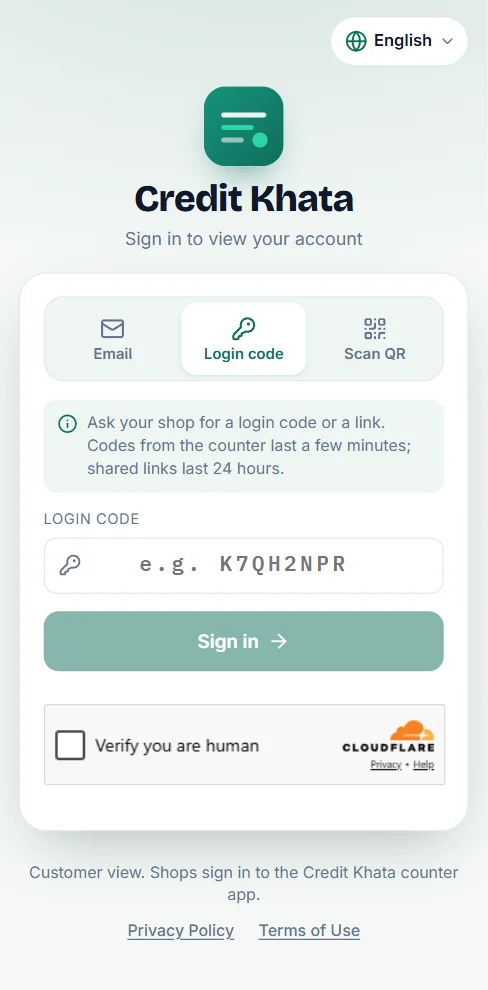
You go remain signed in for dat phone. To add another shop, open your profile and tap Link anoda account.
For Android phone you fit also use di free Credit Khata app: di sign-in page get Get am for Google Play link, and you go sign in to di app with di same code, link or QR from your shop. Di app and di web page dey show di same account.
Read your balance
Di top card dey show Your balance with "You still dey owe", "Di shop dey owe you" or "Everything don settle", and under am, how much you Wetin you buy for credit and how much you Don pay back.
Di shop card dey show your "Payment dey due on" date (or Payment don pass due date if di date don pass), your Credit limit and how much remain, and di Pay and Statement buttons. Under dat one you go see My payments, di shop own details (phone, WhatsApp, directions), and every entry wey dem group by month. Use di search box, di Credit, Don pay and Cash chips, and All month dem to find one entry.
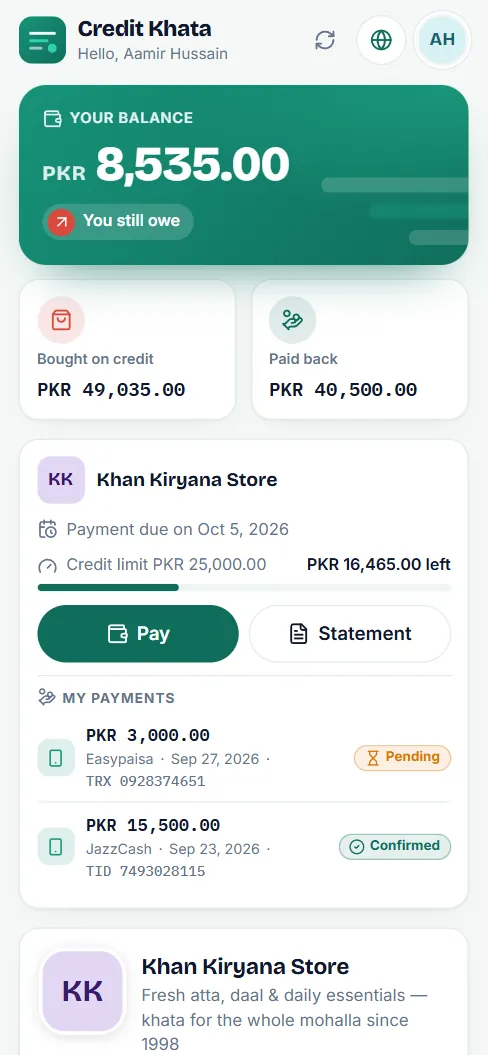
Tap Turn on alert if you want notification every time di shop add entry to your account.
Check entry, or report problem
Tap any entry to see wetin e be for: each item, di quantity and di price. Den:
- Tap E correct if e dey correct. Di shop go see say you don confirm am.
- Tap Report problem if something no correct, write wetin no correct (for example "Na 1 packet I take, no be 2") and tap Send am to di shop.
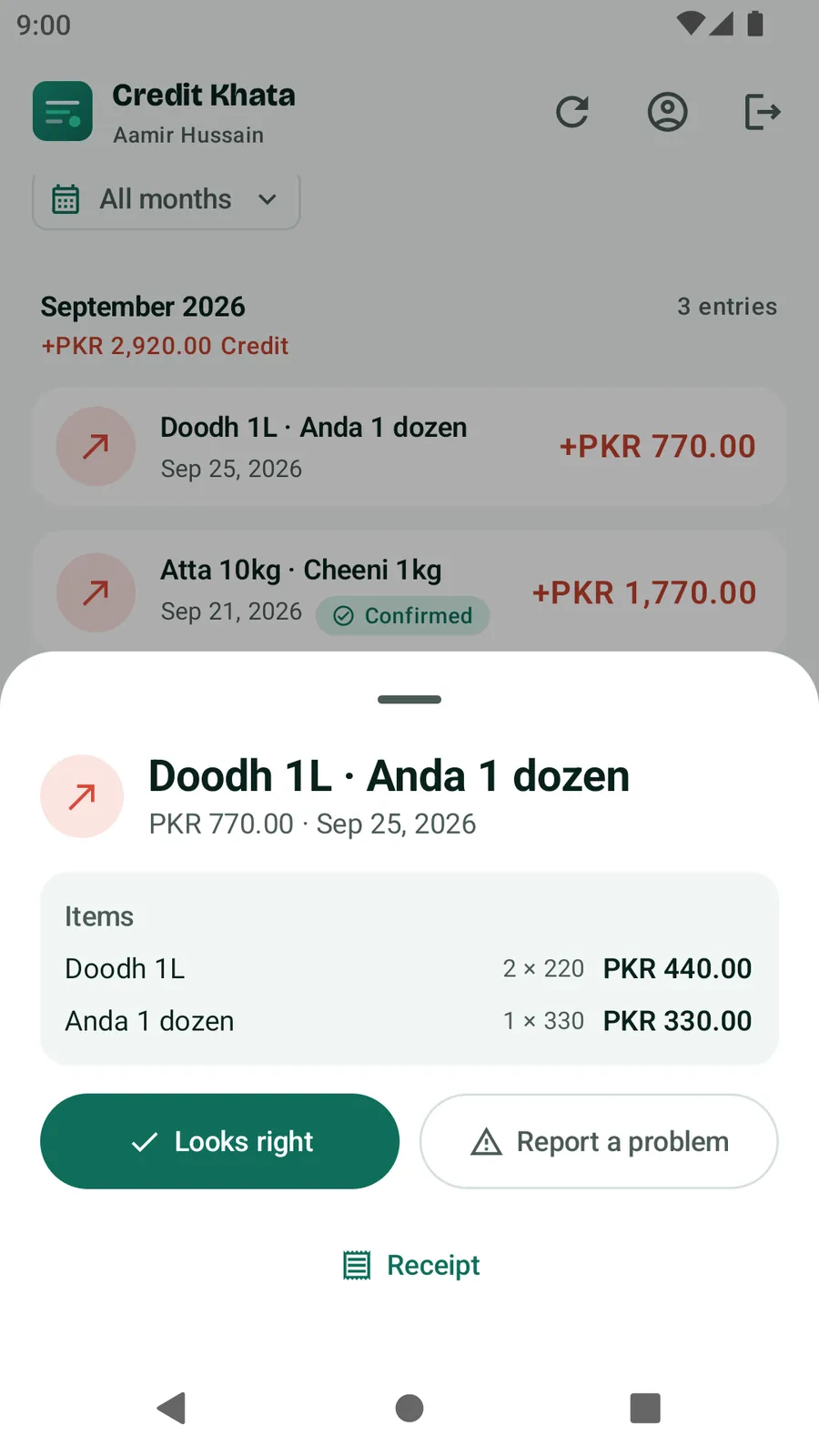
Di entry go show Problem don report until di shop answer. When dem answer, e go change to Dem don settle am and their reply go show under am as "Di shop reply". Report no go change your balance by imself; di shop go correct their ledger if dem agree. You no fit report entries wey pass one year for di app. Receipt dey open receipt wey you fit print for dat entry.
Pay di shop
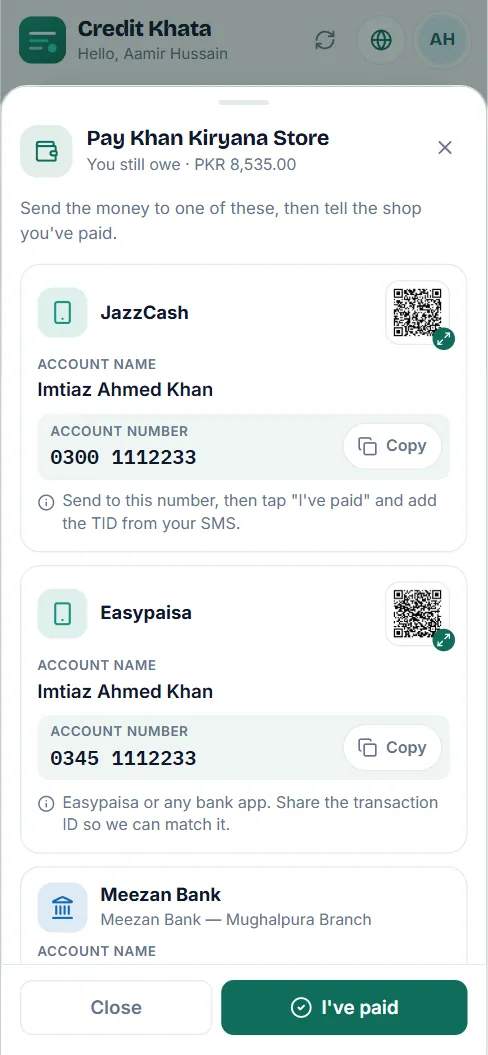
- Tap Pay. You go see di shop payment details, like JazzCash, Easypaisa, Raast or bank account, each one with di account name, di number, Copy button and sometimes QR code.
- Pay for your own wallet or bank app, di way wey you dey normally do am.
- Come back and tap I don pay.
- Put di Amount and How you take pay?. If you add di Transaction ID from your SMS and Screenshot (JPG or PNG, up to 5 MB), e go help di shop find am. Add Note for di shop if you need am.
- Tap Send am to di shop.
Di payment go show under My payments as E dey wait. When di shop confirm am, e go turn Confirmed and your balance go reduce. If dem no fit find am, e go show Dem no accept am with di shop reason. Di money dey go straight to di shop; Credit Khata no dey ever touch am. If di shop never add payment details, pay dem di normal way and tell dem.
Get statement
Tap Statement, choose Dis month, Last month, Choose month, Choose your dates or Everything, den Open statement. Print am, or choose Save as PDF to keep copy. See Print or share customer account statement.
Language, other shops and your privacy
- Change di language with di globe button for top; see Change di app language (Pidgin, Urdu, Arabic, Hindi and more).
- Shop dey see only im own customers. If you delete your sign-in, you go lose access, but di shop go keep im own record of wetin you owe, like paper register. See Download your data, secure your account or delete am.
Questions wey people dey ask
I need install app or pay anything?
No. Your account dey open for any phone browser, and to read am na always free. Di Credit Khata Android app no dey compulsory.
My code no dey work.
Codes wey dem show for di counter dey last about 5 minutes and links dey last 24 hours, and each one dey work only once. Ask di shop for new code or link.
I don pay but my balance never change.
After you tap I don pay, di shop go check their account and confirm am. Your balance go change when dem do am. Until den, di payment go show as E dey wait under My payments.
I fit see my accounts with plenty shops?
Yes. Use Link anoda account and put each shop code. Your accounts go show together with one combined balance.
I don forget my password.
Password reset na for shop accounts. Ask your shop for new sign-in code or link instead.
This article help you?
You need help?
Send us wetin you dey see for screen — screenshot go help — and we go waka you through am.