
Book credit sale for di counter
For short
For Sales, pick di customer under You dey book dis sale for, choose Credit, add each item with im quantity and amount, den tap Add am to credit. Di total go join their balance.
For this page
To book credit sale, open Sales, choose di customer under You dey book dis sale for, set Kind sale to Credit, add each item with im How many and Amount, and tap Add am to credit. Di total go add to dat customer balance sharp sharp, and customer wey don on alerts go get notification with di amount and im new balance.
Na di same screen dey ring cash sales, so na im you go leave open for di counter.
Book credit sale for di Sales screen
- Open Sales. E dey start for Waka-in and Cash, ready for di next customer for line.
- Tap di name under You dey book dis sale for (or press / for keyboard) and search di customer by name or phone.
- Under Kind sale, tap Credit. Di panel go change to New credit entry.
- Add di first line: type di item for Item / description (for example "Tea x2"), set di How many, put di Amount, den tap Add or press Enter.
- Add di rest of di basket di same way. Use − and + to change quantity and × to remove line; di Total go dey update as you dey go.
- Tap Add am to credit. Message go confirm "Credit don enter for" di customer with di amount, and di till go go back to Waka-in and Cash for di next sale.
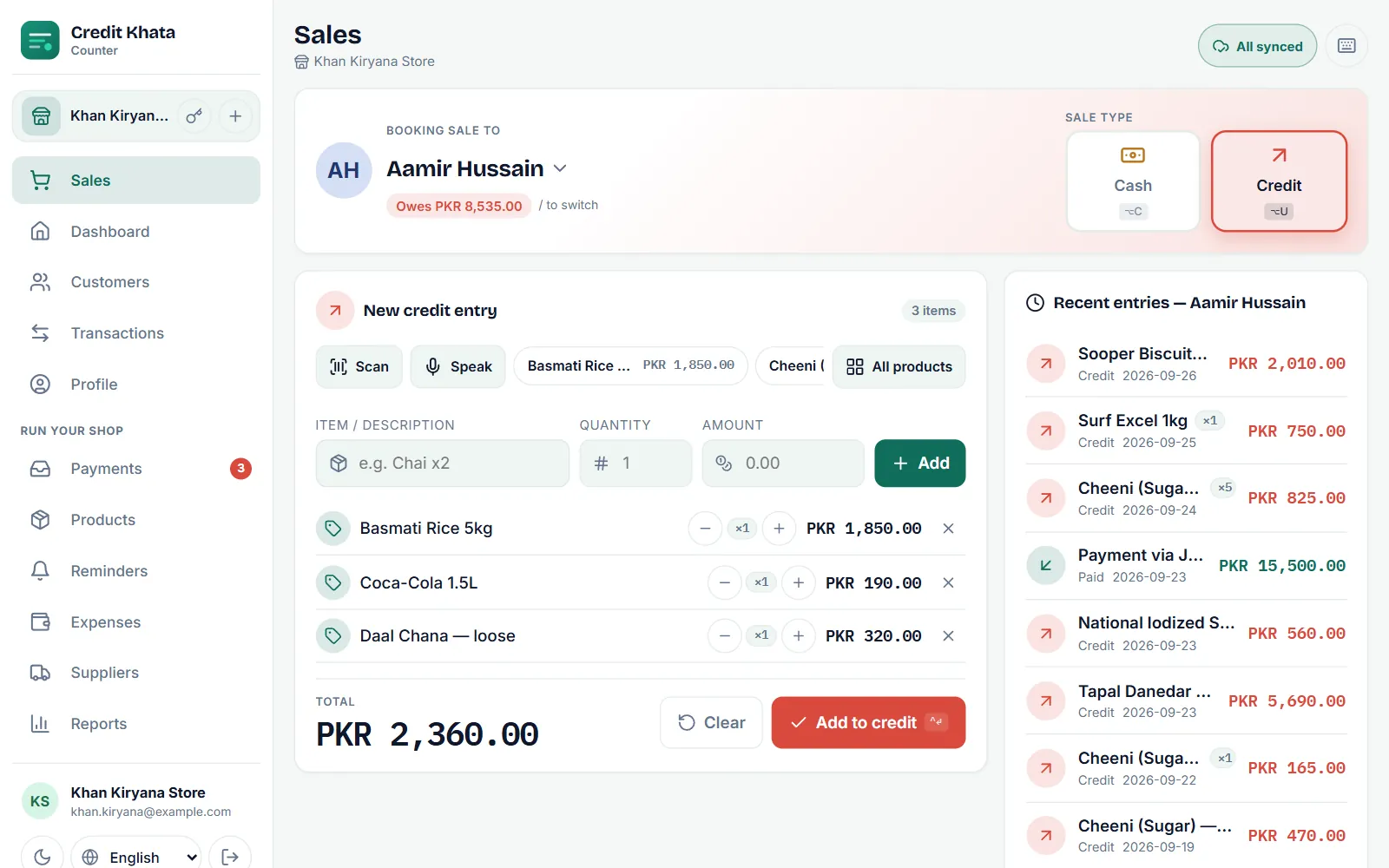
Di box for top dey show wetin di customer don already owe, and Recent entry dem for di right side dey list their last purchases and payments, so you fit answer "how much I dey owe?" before you save.
Faster way dem to add items
- Product chips and All products: once you don add products, tap one to drop am inside di basket with im price.
- Scan: read product barcode with di camera.
- Talk: talk di item and price and e go enter as line wey you go check. Di button dey show when your browser or phone fit take voice input.
When you sell from your product list, e go also remove di items from your stock count. See Add products, track stock and see wetin dey finish.
Book credit from di customer page
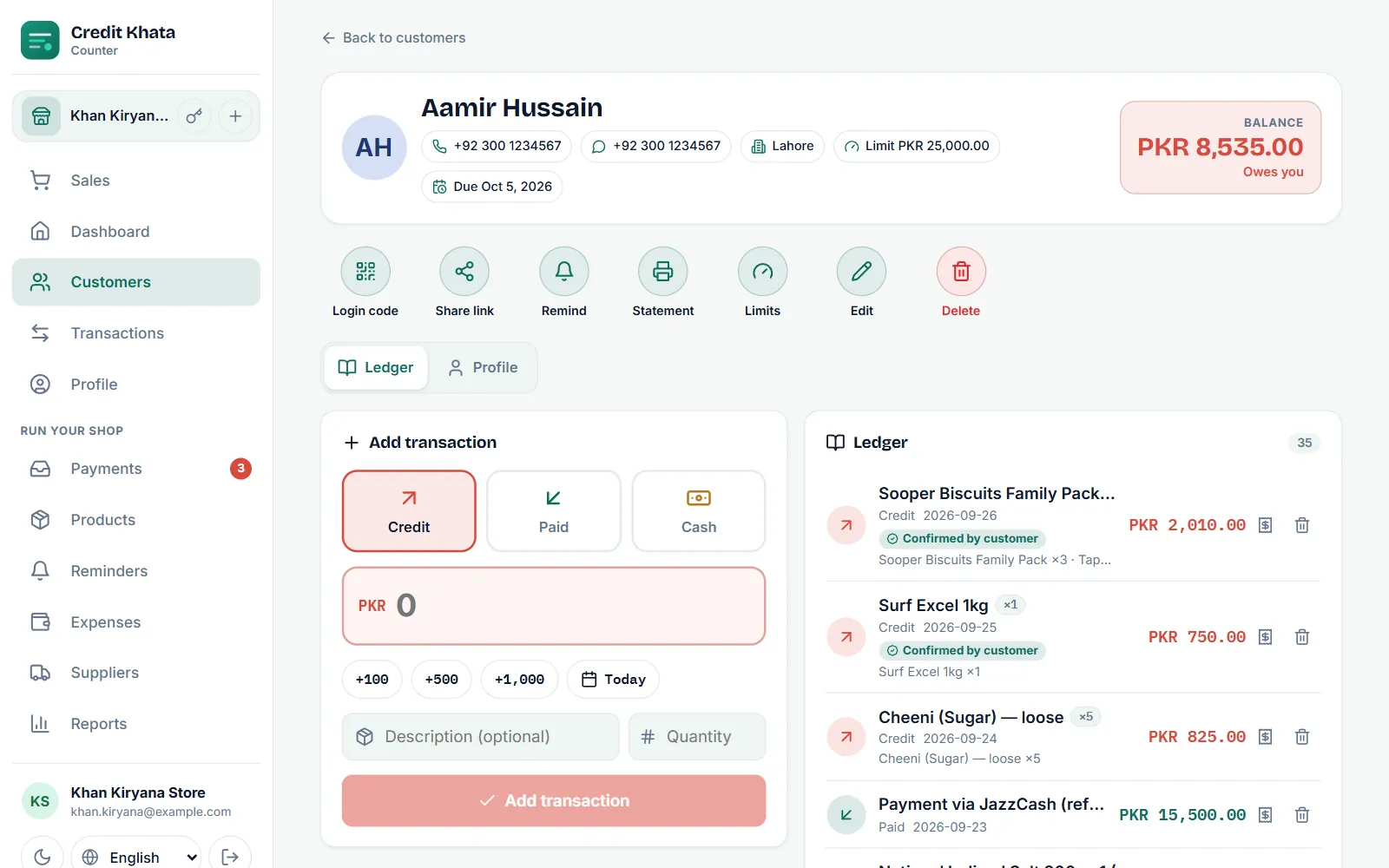
You fit also write entry straight inside one customer account, e dey useful for one single amount or for old purchase:
- Open Kostoma dem and tap di customer.
- Under Add transaction, make you choose Credit.
- Type di amount, or tap +100, +500 or +1,000 to build am up.
- Tap di date chip (e dey show Today) if dem carry di goods for another day.
- Add Description (no compulsory) and How many, den tap Add transaction.
When di customer don near their limit
If di customer get credit limit and dis sale go carry dem pass am, di counter go stop and ask you first. Owner or manager fit choose Book am anyway; cashier no fit pass limit. We explain limits and due dates for Set credit limit and due date for customer.
When today transaction limit don reach
Di Free and Pro plans each dey allow fixed number of transactions every day for di whole business (Business no get daily limit). When di day count don finish, di counter go show "Today limit don reach" and new credit and cash sales go wait until di count start again for midnight for your shop time zone, or until you upgrade. Dem no dey ever refuse payment from customer, and sales wey you save offline before di limit reach go still sync.
Credit, Don pay and Cash: wetin each one dey do
| Type | Use am for | Wetin e dey do to di balance |
|---|---|---|
| Credit | Goods wey dem carry now, pay later | E dey add to wetin di customer owe |
| Don pay | Money wey di customer give you | E dey reduce wetin dem owe |
| Cash | Sale wey dem pay for di spot | No change; e go record as cash sale |
To record money wey dey enter, see Record payment wey you collect from customer.
For di Android app
Tap Sales for di bottom bar, pick di customer, and add lines di same way, den tap Add am to credit. For customer page, di New entry button dey give Credit, Don pay and Cash. Entries wey you save without network go show E dey wait and dem go sync by themselves once you come back online.
Questions wey people dey ask
I fit give credit to waka-in customer?
No. Credit need customer wey get name, because di amount must sit for somebody account. Waka-in sales fit only be cash; add di person as customer first.
I fit record credit sale for date wey don pass?
Yes. Open di customer page, choose Credit under Add transaction and tap di date chip (e dey show Today) to pick di day wey dem carry di goods.
Wetin go happen if internet no dey?
Sale wey you ring for di Sales screen, or for di Android app, go save for di device and e go show E dey wait. E go upload by imself, only once, when network come back.
How I go correct wrong entry?
Owner or manager go tap Cancel entry on top am, for di customer ledger or for Transactions, den book am again with di correct amount. Entry wey dem cancel no go count again but e go still dey di account with line across am, and dem fit bring am back inside 30 days. Nobody dey edit entries for where dem dey, so di history go remain clear.
This article help you?
You need help?
Send us wetin you dey see for screen — screenshot go help — and we go waka you through am.