Accept JazzCash, Easypaisa and Raast payments in a small shop
Share one wallet number and one bank or Raast account, ask customers for the transaction ID, check your own account before you mark anything paid, and match each payment to the khata.
On this page
To take payments by JazzCash, Easypaisa, Raast or bank transfer, share a small number of accounts you check every day, ask customers to send the transaction ID with each payment, confirm the money in your own wallet or bank before marking anything paid, and write each payment against the right customer's khata straight away. The last step is where most shops struggle, and where a shared ledger helps most.
More customers now pay what they owe from their phones: on salary day, from another city, or late at night. That is good for collection, as long as every payment ends up on the right khata.
The main options in Pakistan
| Method | What you share | Good for |
|---|---|---|
| JazzCash | Wallet mobile number and account name | Customers who use JazzCash |
| Easypaisa | Wallet mobile number and account name | Customers who use Easypaisa |
| Raast | Your Raast ID (usually your mobile number) or your IBAN | Instant bank-to-bank payments |
| Bank transfer | Your IBAN, bank name and account title | Larger amounts |
| Cash | Nothing | Customers who come to the counter |
Wallets and banks set their own charges and daily limits, and these change. Check the current terms with your provider, and whether a business or merchant account would suit your shop better than a personal one.
Set it up so customers pay the right account
- Pick one or two methods you actually check every day. Offering five accounts means five places to look for every payment.
- Use the same name everywhere. Customers check the account name before they send; if it matches the name they know, they send with confidence.
- Write the numbers down once, correctly. A single wrong digit sends money to a stranger.
- Add a QR code if your wallet or bank app gives you one. Scanning avoids typing mistakes.
- Tell customers what to send back: the amount and the transaction ID (TID, TRX or reference number) from their confirmation SMS.
Tell your customers once, clearly
Customers will only pay by wallet if they know they can, and know exactly where to send it. Tell your regulars once, in person or with a short private message, for example:
Assalam o Alaikum! You can now pay your khata at [shop] by JazzCash to 0300 1234567 (account name: [name]). After sending, please share the TID from your SMS. Shukriya!
Assalam o Alaikum! Ab aap [shop] ka khata JazzCash 0300 1234567 (account: [name]) par bhi ada kar sakte hain. Bhejne ke baad SMS wala TID zaroor bhej dein. Shukriya!
Replace the number and names with your own. Keep the wording the same every time, so customers learn to trust it, and so a message from a different number claiming to be your shop stands out.
Match every payment to a khata
The hard part is not receiving the money; it is knowing whose money it is. A wallet notification that says "Rs 3,000 received from 0345…" does not always tell you which customer, especially when someone pays from a family member's phone.
A simple routine:
- Ask each customer to send the transaction ID and their name with every payment.
- Once a day, open your wallet and bank, and tick off each payment against the messages you received.
- Record the payment on the customer's khata the same day, with the method and the reference.
- If you cannot find a payment, tell the customer politely and ask them to check the number they sent to.
Stay safe
- Check your own balance, not the screenshot. Screenshots can be edited or reused. Only your wallet or bank shows that money arrived.
- Be wary of "sent by mistake" messages. If someone says they sent you money by mistake and asks you to send it back, check your actual balance first, and return money only through your provider's own process.
- Never share your PIN or OTP, not with a caller claiming to be your bank, and not with staff.
- Keep one person responsible for confirming payments each day, so nothing is confirmed twice or missed.
How Credit Khata handles it
Credit Khata builds this routine into the khata itself. Nothing passes through the app; customers still pay you directly.
- You add your payment details under Payment details: in Pakistan the choices are JazzCash, Easypaisa, Raast, SadaPay, NayaPay, Bank transfer (with your IBAN) and Other. The app checks each number looks the right shape. See Add your JazzCash, Easypaisa or bank details so customers can pay you.
- The customer taps Pay on their khata, sees your account names and numbers with a Copy button and your QR code, and pays in their own app.
- They tap I've paid and enter the amount, the method, the transaction ID and, if they like, a screenshot.
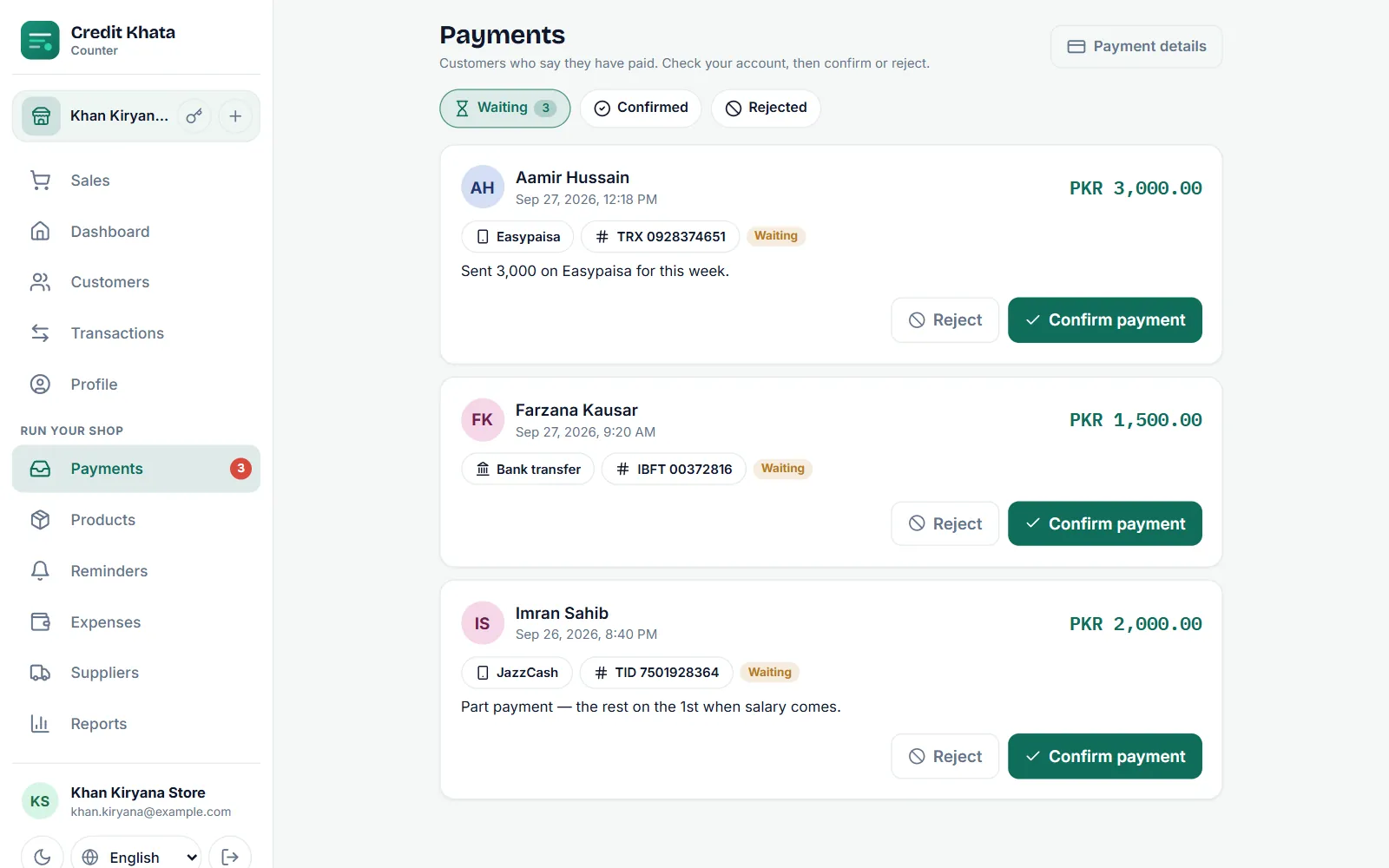
- The claim waits in your Payments inbox. Nothing changes on the ledger yet.
- You check your account and tap Confirm payment. The payment is written on their khata as, for example, "Payment via JazzCash" with the reference, and the customer is told. If the money is not there, you reject it with a reason they can read. See Confirm a payment a customer says they made.
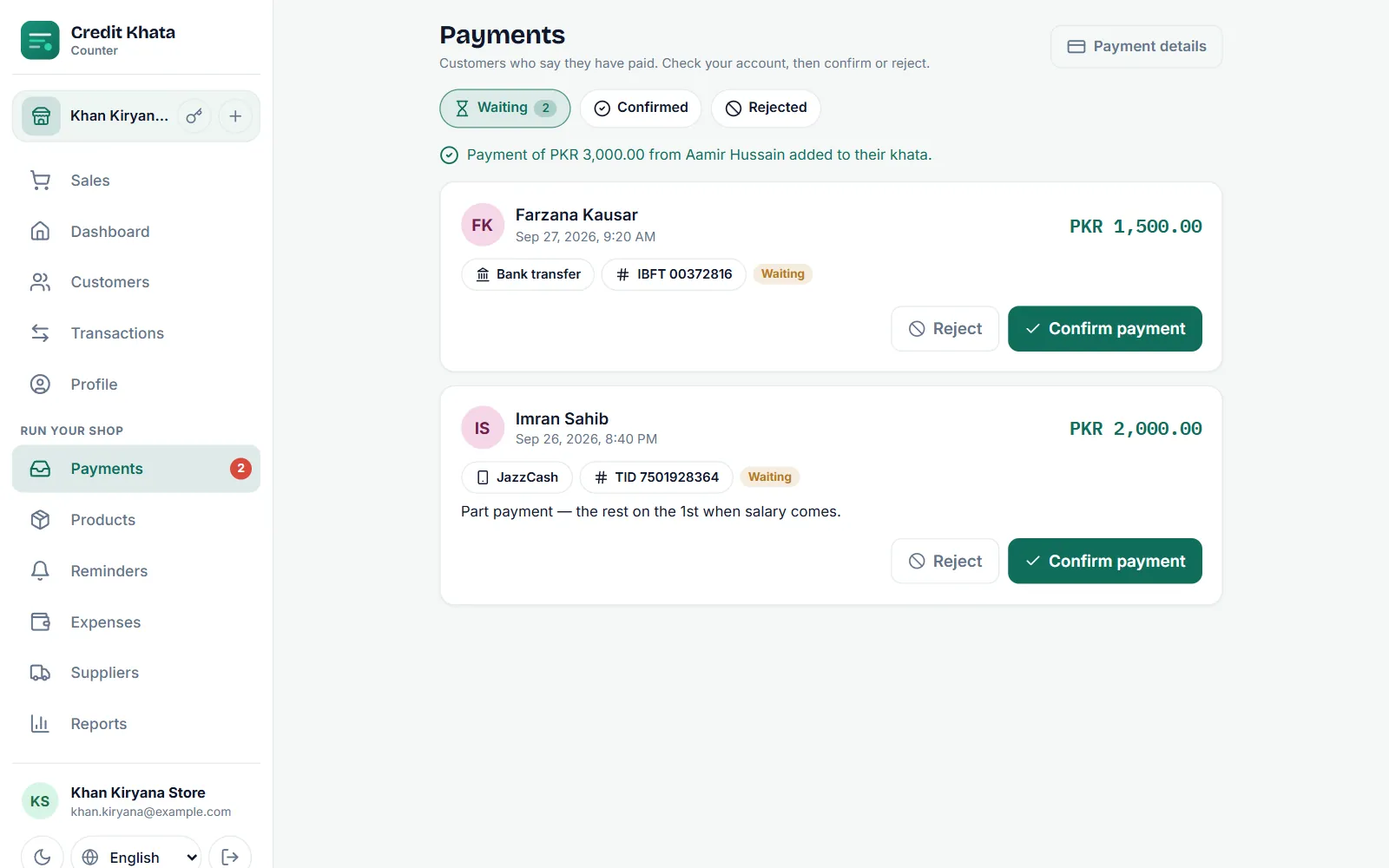
Because the claim arrives with the customer's name attached, the "whose money is this?" problem goes away. And because nothing is written until you confirm, a screenshot alone can never reduce a balance.
Outside Pakistan
The same flow works with the payment apps of other countries. Credit Khata offers each shop the methods used where it trades, for example bKash and Nagad in Bangladesh, UPI in India and M-Pesa in Kenya, alongside bank transfer.
Put the details where customers will see them
- Add your wallet number to your reminder message, so the customer can pay straight from the reminder. Templates are in WhatsApp payment reminder templates for shops.
- Print the number and QR code at the counter.
- Thank every payment, even small ones.
Taking payments digitally does not have to mean losing track of them. One or two accounts, a transaction ID with every payment, and a daily check against the khata are enough.
Frequently asked questions
Can a customer pay my shop by JazzCash or Easypaisa?
Yes. Share the mobile number of your wallet and the account name. The customer sends the money from their own app and gives you the transaction ID.
What is Raast?
Raast is the State Bank of Pakistan's instant payment system. Customers can pay into your bank account using your Raast ID, usually your mobile number, or your IBAN.
Is a payment screenshot proof that I was paid?
No. A screenshot helps you find the transaction, but only your own wallet or bank account shows the money arrived. Always check there first.
Does Credit Khata charge a fee on payments?
No. Customers pay you directly in their own wallet or banking app. Nothing passes through Credit Khata, so there is no cut.
Was this post helpful?